
Route It Right. Refund It Fast. Recover the Value.
KIBO is where supply meets demand.
Commerce-first reverse logistics that routes every return to where it’s worth the most. Your outbound orders already route across stores, DCs, 3PLs, and vendors. Now your returns do too.
Global Companies Trust KIBO to Power Commerce.













Results From Customers Using KIBO
 97% fewer returns
28% decrease in cancellation rate
25% increase in operational efficiency
KIBO is a Leader in IDC MarketScape: Worldwide AI-Enabled Order Orchestration and Fulfillment Applications for Retail and B2C, 2026 Vendor Assessment, and for B2B and Manufacturing, 2026 Vendor Assessment, and in The Forrester Wave™: Commerce Solutions, Q3 2026.
You Route Every Outbound Order. Then It Comes Back.
For commerce-first supply chain execution, you need KIBO.
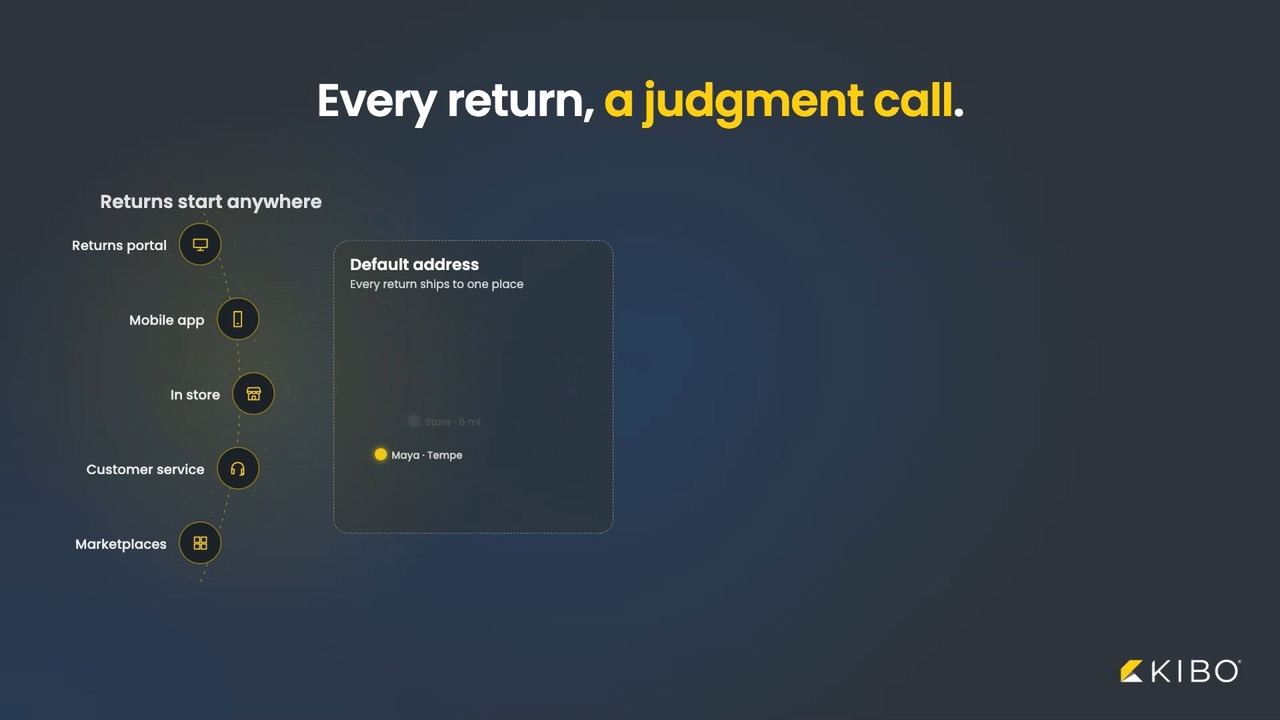
- Returns land at a default address, a judgment call, and a backroom queue.
- Meanwhile freight climbs, refunds wait, and inventory sits in a bin.
~$850B in Retail Returns Estimated for 2025
15.8% of Annual Sales Come Back as Returns
71% of Shoppers Less Likely to Shop Again After a Poor Return Experience
Use the same Order Routing in KIBO OMS for Reverse Logistics. Get the best location at initiation and the best disposition at receiving, and keep your portal with no re-platforming required.
Three Outcomes. One Routing Engine.
The right return location at initiation, the right disposition at receiving, and sellable stock back on the shelf.
Send Every Return to the Right Place First
Best return location per line item, before the label prints.
A return sent to the wrong node pays freight twice. At initiation, KIBO Order Routing suggests the best location for each line item from the return reason and the customer’s address. Mixed returns split automatically. Reps can override. Capacity, product type, and region rules keep returns out of locations that can’t process them.
Send Every Return to the Right Place First
Best return location per line item, before the label prints.
A return sent to the wrong node pays freight twice. At initiation, KIBO Order Routing suggests the best location for each line item from the return reason and the customer’s address. Mixed returns split automatically. Reps can override. Capacity, product type, and region rules keep returns out of locations that can’t process them.
Reduce the Backroom Queue
Condition in. Decision out.
Receivers record each item’s condition: Good, Bad, Refurbished, or Like New by default, or your own options. KIBO suggests the disposition location instantly, pre-filled and still overridable. Fewer manual touches mean fewer “where’s my refund?” contacts.
Put Every Item Where It’s Worth the Most
Restock, refurbish, liquidate, or dispose. By rule, not by guess.
Recovery is a placement decision. “Like New” goes back to sellable stock. Cosmetic damage goes to refurb. Warranty returns go to certified repair. Sort by Lowest Available Inventory to restock where stock runs thin and, when enabled, update on-hand inventory immediately.
What’s in the Box
Right Place, Before the Label Prints
At initiation, by a rep or your returns front end, KIBO suggests the best location for each line item. Different items, different places? Separate returns, created automatically.
- Suggested location per line item, in the Admin UI or your own returns front end
- Driven by return reason and the customer’s shipping address
- Automatic multi-return splitting
- Rep override on every suggestion
- Return location management: choose which stores, DCs, or vendors accept returns, with rules for capacity, product type, and region
- Sort by Rank, Distance, or Lowest Available Inventory
Right Place, Before the Label Prints
At initiation, by a rep or your returns front end, KIBO suggests the best location for each line item. Different items, different places? Separate returns, created automatically.
- Suggested location per line item, in the Admin UI or your own returns front end
- Driven by return reason and the customer’s shipping address
- Automatic multi-return splitting
- Rep override on every suggestion
- Return location management: choose which stores, DCs, or vendors accept returns, with rules for capacity, product type, and region
- Sort by Rank, Distance, or Lowest Available Inventory
Every Item Gets Its Best Next Step
At receiving, record the condition. KIBO suggests where the item goes: restock, refurbish, liquidate, or dispose. That location can differ from the one that accepted the return.
- Condition capture per item: Good, Bad, Refurbished, Like New, plus custom options through API extensions
- Disposition location suggested per line item, pre-filled and overridable
- Outcomes: restock, refurbish, liquidate, or dispose
- Receive and dispose workflows in the Admin UI and Fulfiller UI
Your Outbound Routing Playbook, Pointed Backward
Return and disposition strategies use the same scenarios and filters as fulfillment routing. If you configure outbound routing, you already know how this works.
- Separate Return and Disposition strategies
- Sort by Rank, Distance, or Lowest Available Inventory
- Lowest Available Inventory restocks where stock is thinnest
- First-class filters on return reason and item condition
- Extensible location attributes for capability and compliance, such as refurb-capable or certified repair locations
- Product attributes, custom item data, and customer segments can factor in
Sellable Stock, Back on the Shelf Fast
Restock is optional. When a receiver chooses it and your site setting is on, on-hand inventory updates immediately. “Like New” sells again without waiting in a queue.
- Optional on-hand update on restock, controlled by a site setting
- Lowest Available Inventory sends restocks where inventory is thin
- Condition mapping supports compliant processing and warranty tracking
- Items that can’t be restocked go to refurbish, liquidate, or dispose by your policy
One Record, From Order to Return
Core returns management ships with KIBO OMS. Reverse Logistics adds routing on top, so the decision and the execution live in the system that took the order.
- Return initiation and authorization (RMA) with return rules: eligibility windows and quantity limits by product and customer segment
- Refund or replace per line item
- Automated return labels and customer status emails
- Return creation and receiving workflows in the Admin UI and Fulfiller UI
Keep Your Portal With Added Decisioning
API-first. Expose suggestions to your existing returns experience, and read the routing decision logs to see why each one was made.
- Dedicated Reverse Logistics Suggestions API that works alongside your customer-facing returns portal
- Routing decision logs for verification, debugging, and audit
- Custom condition options through API extensions
- Same Order Routing APIs and constructs you use for fulfillment
- Enabled by KIBO Support as part of your tenant configuration, with no re-platforming
The KIBO Platform: Ready for Whatever’s Next
Launch Agentic Quickly
KIBO AI is native. The Order Routing Agent explains, from your routing logs, why an order or return routed the way it did, forward and reverse. The Shopper Agent handles order status, return requests, and product search, with live handoff to a human. An MCP Server connects AI tools to your live commerce data.
Compose Commerce Your Way
MACH-certified and API-first. Add Reverse Logistics to the KIBO OMS you run today and keep the returns portal you have. Use the API, the Admin and Fulfiller UIs, or both.
Scale Through Every Peak
Cloud-native services scale automatically through post-holiday return waves, seasonal peaks, and flash-sale fallout, processing millions of orders without performance degradation.
Stay Compliant by Default
SOC 2 Type 2, SOC 3, and PCI DSS Level 1, with GDPR, CCPA, and CPRA built in. Location certification attributes and condition mapping send warranty and regulated returns only to qualified locations, and routing decision logs give you the audit trail.

Leader in AI-Enabled Order Orchestration
& Fulfillment Applications for Retail &
B2C, 2026
Leader in AI-Enabled Order Orchestration
& Fulfillment Applications for B2B &
Manufacturing, 2026

Leader in The Forrester Wave™: Order Management Systems, Q1 2025